


Land Rover parts & more
We are importing, exporting and do international delivery of goods like land rover parts, car parts, human & veterinary medicine supplies, I T.

Here To Help
You can find answers about our offer at INFOLINE: +48601375344


We offer Land Rover parts, human medicine, veterinary, IT, agriculture to make your business a success!

AUTOMOBILE
Car parts in best price
Find parts...

HEALTHCARE
Human / Vet Medicine
Read More...

AGRICULTURE / PRODUCTION
Read More...

IT TECHNOLOGIES
Methodology to ensure success
Read More...

The Template's Settings
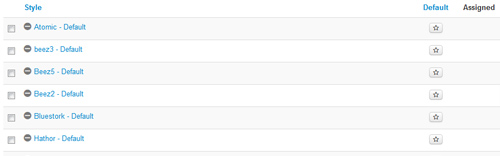
This template comes loaded with options that you can use to customize your site exactly how you want it. Here's how to get to these custom settings:
- In the backend of Joomla go menu item Extensions/Template Manager.
- Click on the title of the template.
- This will bring you to the template manager screen where you can edit the template's parameters.
- Click save when you are done
Template Specific Options
Every template built on Vertex also comes with its own unique template specific options applicable to that particular template such as highlight colors, social icons, and much more. These features are in addition to the standard functions of Vertex, and are still controlled through the very user friendly interface of Vertex. This page will document the features specific to this template.
Template Specific Configuration Interface of Vertex
Below is a screenshot that shows all the template specific features available in the user friendly Vertex admin: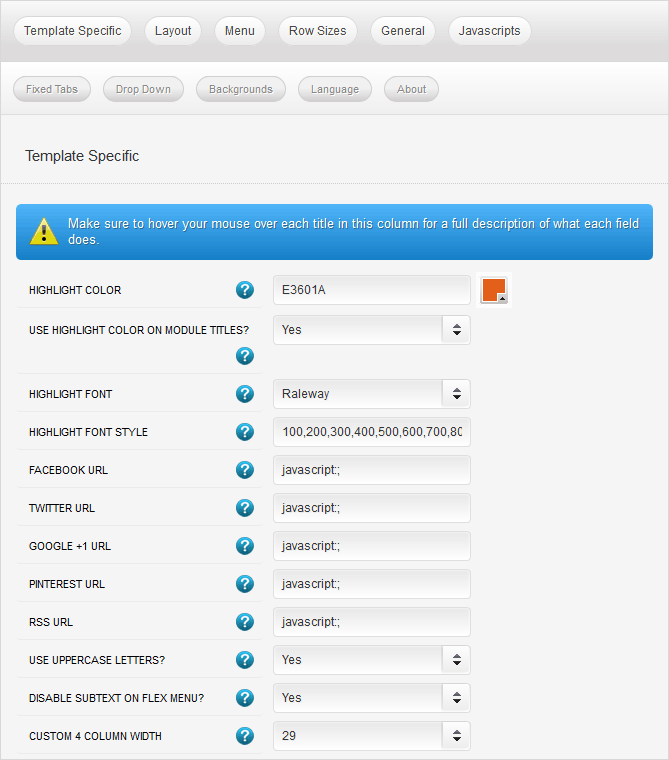
Custom Highlight Colors
Set your own custom color scheme with the built in highlight color. This color controls menu items, titles, buttons, hover over effects, and much more, the template's script will automatic use several variations of the same color to create gradients. You can set these colors to any color that you want. Below is an example of how this works.
Module Title Highlight Color
By default module titles will be shown with two colors; the first word uses highlight1. You can disable this feature and use a single solid color as well.
Custom Highlight Font
Choose a custom highlight font powered by Google fonts. You can set a custom font for the titles, buttons, and much more. This is used in conjunction with the default site font which is controlled under the Layout tab of Vertex, and controls many other elements as well.
Social Icons
Easily link to a social media site with the built in social icons found in the header of this template. Simply enter the url of your social site in the configuration and the icon will automatically appear. To disable an icon simply leave the url blank for that particular icon.
Uppercase Leters
Choose to enable or disable uppercase letters on most menu items, buttons, titles and more.

Small Menu
The S5 Flex Menu gives you the ability to have subtext on each menu item. If you choose not to use subtext on the first level links simply choose to disable this option and the menu will automatically down size.

Custom 4 Column Width
This template comes with a custom_4 module position that is next to the component and article area. This is a column that is outside the normal layout of Vertex, so it is included in the Template Specific tab. You can set this column to any width that you wish. Please note that it will disable at tablet width, it is intended for desktop view only.Stock Photography
Site Shapers
So what are Site Shapers? They are quick installs of Joomla combined with all the modules, content, etc used on our demo, excluding stock photography. Within a few minutes you can have your site up, running and looking just like our demo. No more importing SQL dumps and installing modules. Just head on over to the download section of this template and grab a Site Shaper. Simply install the Site Shaper like any other Joomla installation, it's that easy!
How to setup a Site Shaper
- Login to your cpanel or your server admin panel.
- Locate the area where your databases are (usually labeled Mysql Databases)
- Create a new database
- Next create a new database user and assign it to this newly created database in the previous step
- You will then need to extract the site shaper to either a folder on your server or the root directory such as WWW. NOTE: if you already have a website in the root of your WWW folder, we suggest creating a new folder and extract the site shaper there. If your cpanel does not have an extract option or you cannot find it, you may also extract the contents of your site shaper in to a folder on your desktop and upload all the files via an ftp client to your server.
- Next, navigate to the url where you extracted the site shaper via your web browser.
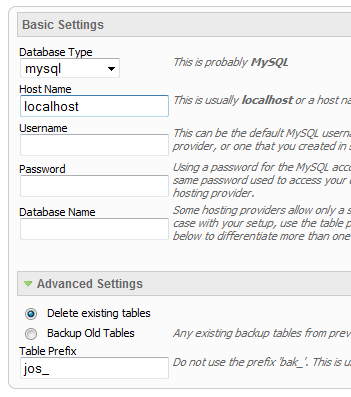
- Continue through each screen until you reach the below screenshot:
- At the above screen be sure to enter localhost as shown, continue to fill in the following text fields with your newly created database and username information
- Follow through the rest of the site shaper setup and click the install sample data at the last screen and the installation is complete! (be sure to rename/remove the installation directory after finishing the install)
Search Engine Optimized
SEO - Get your site noticed!
Not only is this template beautifully designed but it is great for search engine optimization as well! What is SEO? It is simple the act of altering a web site so that it does well in the organic, crawler-based listings of search engines such as google.com. How does this template accomplish this? It's simple, the majority of your most valuable content is found in the main body of your site, through css we are able to alter the layout of the site and call the main content before the left and right columns are called. This allows for your content to be found first by search engines before it reaches your other content, which is vital in search engine optimization. This is a common feature this can be done with almost all of Shape 5 templates as well.
Hear It From Our Customers

Steven Meyers
Lorem ipsum dolor sit amet, consectetur adipiscing elit. Nullam fermentum luctus lacinia. Integer rhoncus vehicula nulla. Aliquam adipiscing egestas leo ut bibendum. Duis et erat aliquam, condimentum nibh nec, faucibus dolor. Sed sollicitudin aliquam augue, sit amet sollicitudin magna rutrum ac. Fusce non blandit est, in placerat nibh. Suspendisse potenti. Integer et diam eu elit tristique sodales et id odio. vehicula ipsum.
Kelly Andrews
Sed commodo ligula ac mauris laoreet varius non eu sapien. Pellentesque sagittis ligula ac turpis consequat eleifend. In velit orci, viverra in nunc et, feugiat tempor lectus. Donec non consectetur dui. Nullam pulvinar nisi vel pharetra semper. Fusce consequat ut libero placerat interdum. Donec ultricies lorem libero, id porta orci pretium gravida. Integer sed lorem malesuada velit rhoncus ullamcorper.


Our Business Hours
We are here to serve you during the following business hours:
Monday to Friday: 9am to 5pm
Saturday and Sunday: Closed
Phone: +48601375344
Contact Us Today