Sample Sidebar Module

This is a sample module published to the sidebar_top position, using the -sidebar module class suffix. There is also a sidebar_bottom position below the menu.

Sample Sidebar Module

This is a sample module published to the sidebar_bottom position, using the -sidebar module class suffix. There is also a sidebar_top position below the search.
Home
  • Register
  • pl-PL
  • English (UK)

global land rover parts

Land Rover parts & more

We are importing, exporting and do international delivery of goods like land rover parts, car parts, human & veterinary medicine supplies, I T.

Cust2 2

Here To Help

You can find answers about our offer at INFOLINE: +48601375344
Cust2 3

Cost Savings

We delivery goods in possible lowest prices but in the highest quality and the shortest possible time.
Iacf1

We offer Land Rover parts, human medicine, veterinary, IT, agriculture to make your business a success!

Icon1

AUTOMOBILE

Car parts in best price

The cheapest online source for all your aftermarket parts and accessories needs. Huge Savings & cheap delivery! all us today ...
Find parts...
Icon2

HEALTHCARE

Human / Vet Medicine

Learn more about our human and vet medicine offer. Fastest delivery and good service especially for you and your family.
Read More...
Icon3

AGRICULTURE / PRODUCTION

Learn more about our agriculture and production offer. Fastest delivery and good service especially for you and your family.
Read More...
Icon4

IT TECHNOLOGIES

Methodology to ensure success

Learn more about our IT and technoligies offer. Fastest delivery and good service especially for you and your family.
Read More...

land rover parts modestygroup logo


All modules are fully collapsible

What exactly is a collapsing module? It's quite simple, whenever a module is not published to a postion that position does not appear on the frontend of the template. Consider the example below:



This particular row has 6 module positions available to publish to. Let's say you only want to publish to 4 of these positions. The template will automatically collapse the modules you do not want to use and adjust the size of the modules accordingly:



If no modules are published to the row the entire row itself will not show. The best feature of this is every module can be published to its own unique pages so the layout of your site can change on every page!


Infinite Layouts

Because there are so many module positions available in so many different areas, the number of layouts you can create are limitless! For example, if you would like to show your main content area on the right side of your site but still have a column of modules, simply published your modules to the right or right_inset positions or both. The same would be true for the opposite, if you want a column on the left simply publish modules to left or left_inset. Of course you can always choose to not have a column at all. Remember, any module not published to will automatically collapse and the remaining area will automatically adjust. There is no need to choose a pre-defined layout for your entire site, simply use the power of collpasing module positions and take advantage of the numerous amount of module positions to create any layout you can dream of! Be sure to checkout the layout of modules below.


Dozens of Modules

Below is a complete list of all the module positions available for this template.


How to install and setup module styles:

  1. Download any module you wish to publish to your site.
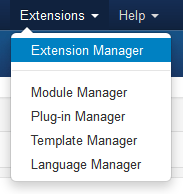
  2. In the backend of Joomla navigate to the menu item Extensions/Install Uninstall

  3. Install Menu
  4. Browse for the module's install file and click Upload File & Install.
  5. Once the module has be installed navigate to the menu item Extensions/Module Manager (same menu as above)
  6. Find the Module just installed and click on it's title.
  7. Change any parameters that you wish and be sure to set it to published and publish it to your desired module position.
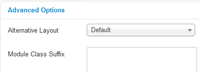
  8. To apply a module style simply fill in the module class suffix field with any of this template's included module styles. This parameter setting is found under Module Parameters on the right side of the screen.

  9. Module Suffix
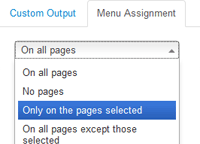
  10. Assign what pages you would like the module to appear on and finally click Save.
  11. Page Assignment

Hear It From Our Customers

  • Tab1

    Steven Meyers

    Lorem ipsum dolor sit amet, consectetur adipiscing elit. Nullam fermentum luctus lacinia. Integer rhoncus vehicula nulla. Aliquam adipiscing egestas leo ut bibendum. Duis et erat aliquam, condimentum nibh nec, faucibus dolor. Sed sollicitudin aliquam augue, sit amet sollicitudin magna rutrum ac. Fusce non blandit est, in placerat nibh. Suspendisse potenti. Integer et diam eu elit tristique sodales et id odio. vehicula ipsum.
  • Tab2

    Kelly Andrews

    Sed commodo ligula ac mauris laoreet varius non eu sapien. Pellentesque sagittis ligula ac turpis consequat eleifend. In velit orci, viverra in nunc et, feugiat tempor lectus. Donec non consectetur dui. Nullam pulvinar nisi vel pharetra semper. Fusce consequat ut libero placerat interdum. Donec ultricies lorem libero, id porta orci pretium gravida. Integer sed lorem malesuada velit rhoncus ullamcorper.

Experience To Trust

Va5
Consectetur dolor sit amet, consectetur adipiscing elit. Mauris tristique lorem eu turpis iaculis.

Ecological Business

Va6
Nam ut augue quis nulla hendrerit dignissim. Fusce vitae massa lectus. Nulla sit amet purus.

Best Technology

Va4
Consectetur dolor sit amet, consectetur adipiscing elit. Mauris tristique lorem eu turpis iaculis.

Our Business Hours

We are here to serve you during the following business hours:

Monday to Friday: 9am to 5pm
Saturday and Sunday: Closed
Phone: +48601375344

Contact Us Today